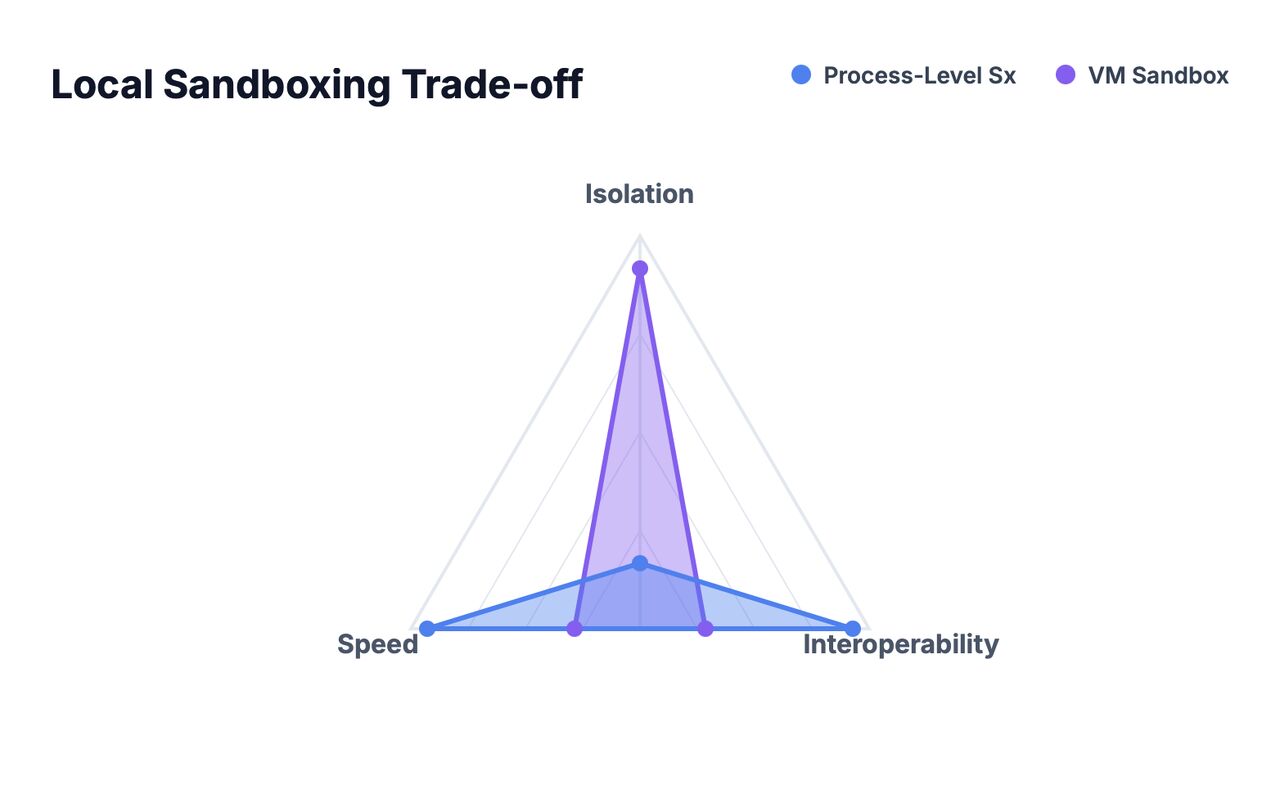
More protection usually means more friction. So when do you actually need more than process-level sandboxing?
I’ve been working extensively with local sandboxes, and the experience has sharpened how I think about isolation and its trade-offs. I wanted to share what I’ve learned.
When we run things locally on our “host”, we want to protect resources such as:
- files: private or work-related data
- environment: user settings and environment variables
- secrets: credentials and sensitive files
- networked resources: cameras, storage, and other local devices
- applications: other apps should remain stable
- hardware: cameras and microphones
- internet access: preventing data exfiltration and malware downloads
Roughly speaking, sandboxing lets us run software we don’t necessarily trust while minimizing its ability to access or change the resources we want to protect.
Local sandboxing falls into two main camps:
- process-level sandboxing (PL): software isolation enforced by the operating system at runtime
- VM sandboxing (VM): hardened, hardware-backed isolation
This is one of those cases where you can’t simply choose the option with the most protection. Stronger isolation usually comes with more friction, so we have to be strategic about when it is worth making our workflow less convenient.
PL and VM sit at opposite ends of these axes:
- Speed: start-up time, responsiveness, and runtime performance
- Interoperability: stored files, other apps, and integrations
- Isolation: hardware-backed versus software-backed
(Another interesting axis to think about: are you protecting the host, or are you protecting the workload?)
The takeaway here is simple: Process-level sandboxing is designed to let you get things done. VM sandboxing needs to justify its additional friction.
Software has two basic needs:
- resources it needs to run: access to hardware such as the GPU, other software, and operating system services
- resources it needs to be useful: access that provides value to the user, often by interacting with some of the sensitive resources we want to protect
We don’t usually care what a piece of software needs just to run, as long as we can provide it. We are looking for functionality, such as an app that can read scanned receipts, and we are happy to let it access the folder where we keep those receipts. It is straightforward to express this as a policy that the sandbox enforces.
VM sandboxing is justified when software needs broad access simply to run. Chromium is a case in point. It is easier to list what it doesn’t need access to. Wrapping it in a restrictive policy means poking so many holes that the policy stops protecting much.
This is where VMs become useful. Chromium gets its own private OS with much less need for restrictive policies. All that remains is to explicitly give this “private OS” access to specific resources, such as the files we want it to interact with. Chromium can then function as intended while the VM protects what we care about.